
Any company needs to be managed - whether it's an online store, a small car service, an oil company or a transnational corporation. To do this, there are many solutions on the market, but often small and medium-sized businesses do not need them because of the heap of the interface and the resulting complexity of the system, as well as not too adequate pricing. In this case, it's better to look at third-party services - we looked closely .

Your employees probably spend a lot of time on social networks (if you do not know about it, believe me, this is so), and you can get them out only by providing an alternative solution with similar logic. This is exactly what Zettaplan is: this full-fledged network for your employees, contractors and customers, with which to monitor the performance of tasks and the business as a whole will be much easier.

In Zettaplane, each employee has their own profile with a photo, position, contact data and other useful information that you will need. You can fill out the profile yourself or import data from VK or Facebook - however, small details like the boss, subordinates and employee time will still have to be entered manually.

The interface of the service is convenient and pleasant - in one click you can contact the right employee, assign him a task, attach files or even dismiss (if you, of course, have the appropriate rights and powers). There is no need to purchase any additional courses, as it often happens, when directors can not understand the new program. The structure of the company, the list of employees, tasks, documents - everything, as in real life. For example, to write a personal message to a colleague or discuss a question collectively, you need to go to the "Discussions", look at the list of projects in the "Tasks" section, and distribute employees by department to "Structure". The sections are on the left for easy navigation.


In the section "Contacts" you are given a full carte blanche: add contact information of customers, employees, contractors, contractors - all who you may need. The window for adding a new contact is similar to the one on the same iPhone, so it's easy to understand. As a result, we will get a decent base of contacts, including competitors, which, as a rule, becomes one of the most important resources of the company.

In general, to get acquainted with the Zettaplane and fill in the basic information will take no more than one day, after that you can safely use this powerful tool to manage the company. The "Tasks" section is used to moderate all tasks and projects. For each task, you can appoint performers, set deadlines, make a subtask and take it under control, if the financial well-being of the company depends on its fulfillment.

In Zettaplane, you can not only assign tasks, but also divide them among employees, and also give external references to tasks, discussions and documents for those who do not have access to the system. It works by analogy with google-documents and is very useful if the client, for example, wants to know at what stage his project is located. Hardly for this you will add it to your network.
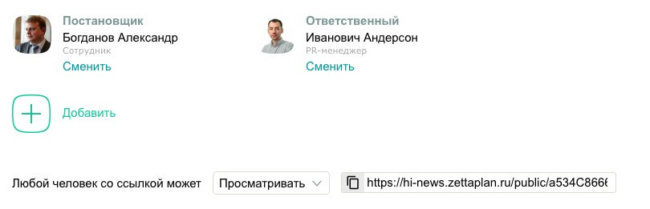
For each task, you can add a comment, including a specific user, and attach the documents. It happens that it is impossible to fulfill the task in time, and we need to notify the general director about it. In order not to disturb other employees, it is better to mention a particular leader. Notifications can be received not only in the program itself, but also with the help of SMS. It is convenient that for the tasks the recurrence period is adjusted: for example, every two weeks the secretary should order stationery, and every year before March 8 - draw out flowers to congratulate the ladies on the holiday. Set the appropriate time intervals and rest assured that no one will forget anything.
In the "Tasks" menu there are several templates available, such as an employee reception, a client request, a freelancer task and so on. It's great to simplify the work of HR-managers, users support staff, managers of special projects and not only. It took a new employee? Entered the necessary parameters, assigned the task to the personnel officer and a week later we are waiting for the release of a new member of the team. In the tasks of the freelancer there is a point "Costs" to control how much money goes to one or another outsourcer. An important function in the templates is the "Plan / fact" fields, which allow you to plan and take into account the actual costs of any type of resources, time, money, and much more.

And, of course, for all tasks and projects, you can get a report, even for small details like the tasks of a particular employee. A nice bonus is the ability to import all the necessary data from the google-scheduler, Excel, contacts from Gmail. Try it yourself!
The article is based on materials .
Comments
Post a Comment