
An Android 1.1 update for the T-Mobile G1 was released in February 2009. It is possible to say about him not only that this firmware eliminated many defects peculiar to the first version. Its important advantage was the ability to receive updates "by air". Today it sounds mundane, but then this opportunity was a great progress. But the main theme of the current story will not be it, but Android 1.5 , better known by its codename Cupcake . So English-speaking gourmets call small cupcakes. Today, Android , along with the history of iOS , dominates the market of operating systems for mobile devices.
I must say that this version of the platform laid the tradition of Google to give its mobile operating systems "confectionery" names in alphabetical order. Some letters are excluded from this list, like “X”, from which the names of popular sweets do not begin. But in general, this principle of naming has been preserved even now.
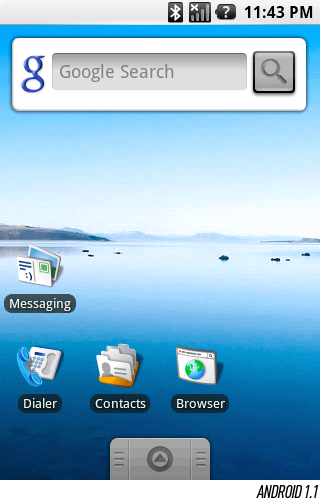
Cupcake has brought a certain gloss to the original "android" interface. Some changes are almost imperceptible if you do not know about them. A good example is the standard Google search widget located on the home screen of many devices. He found transparency and was slightly decorated. Users of operating systems 1.1 and 1.5 may not even notice any differences. Everything, from text alignment to shading the status bar, looks the same. Most G1 users did not even pay attention to changes in the operating system interface. But you cannot say that Android 1.5 was just a minor update.
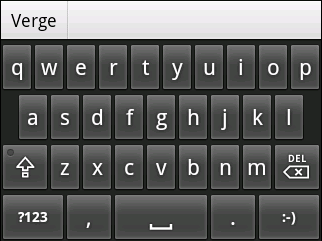
Screen keyboard. Today, for many, the fact that the first Android was deprived of even a hint of an on-screen keyboard is surprising. The fact is that the T-Mobile G1 was a horizontal slider with a physical QWERTY-keyboard. In April 2009, Android 1.5 became the platform of HTC Magic, the first phone based on Google’s mobile operating system, which has a touch-only interface.
Along with the introduction of a virtual keyboard into its mobile OS, Google took a significant step forward: the search company gave developers the opportunity to create their own keyboard, replacing the standard one. This feature still distinguishes Android from its rivals. Neither iOS nor Windows Phone provides such an opportunity to third-party application creators. Appeared in Android 1.5, the on-screen keyboard, according to many critics, was inferior to a similar element of the iOS platform in speed and accuracy. This prompted phone makers such as HTC to accelerate their keyboard development for their Android devices. This was the first example of remaking Android electronics makers.
Expanded widget system capabilities. Widgets were present in Android 1.0 and 1.1, but their potential could not be fully disclosed, since Google did not provide the developers with the SDK. Therefore, users were only a few widgets. Starting with version 1.5, many (if not most) third-party application developers offer users one or even several widgets. For Android, this quality is important. Widgets make the platform flexible compared to other mobile operating systems, and its home screen is more customizable to the needs of each user.
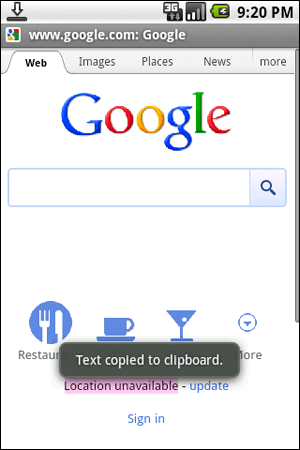
Advanced clipboard. Copy and paste functions on Android have undergone a difficult path of improvement. Initially they were present, but their scope was limited to text fields and links. This meant that the text could not be copied from the browser window or Gmail. But it is from there that the user most often needs to copy the text fragment. Before the clipboard became compatible with Gmail, Google needed to release several versions of its mobile platform. Browser support has been added to Cupcake with the ability to copy plain, unformatted text from its window.
Video capture and playback of recorded. Today it is difficult to imagine a smartphone that would not know how to shoot a video. But users of the T-Mobile G1 with such a smartphone were intimately familiar. With the arrival of Cupcake, this problem was theoretically solved. In practice, the camera interface built into the system has become the most criticized element of Android 1.5. This interface was soon replaced by device manufacturers. Their versions were more interesting and contained additional scenes, modes and options, as well as comfortable solutions, such as touch focusing.
Much more. Prior to version 1.5, the user did not have the ability to delete or archive a group of messages. It was in Cupcake that support for YouTube and Picasa was implemented. In the same system, ubiquitous (within the platform) access to the statuses of Google Talk contacts appeared: from the contact window, the Messaging application, and Gmail. Synchronizing extended contact information between various applications and screens has become the direction Android continues to take.
Android 1.6 Donut deserved more than adding one tenth of the version number. External changes were minimal. Most of the improvements have touched the software side, which the user does not see, but feels great when it comes to screen resolution or the cellular network he needs.
This donut platform continued the tradition of Google’s sweet names for mobile operating systems. She brought with her support for CDMA networks, opening the way for "android" smartphones to hundreds of millions of Asian subscribers, as well as customers of Verizon operator in the United States.
Donut for the first time provided support for the Android platform of various sweeps and screen resolutions. This was the starting point for the appearance of phones, the screen resolution of which was different from the original 320 x 480, fixed in the portrait (vertical) scan. If you look at the numerous family of modern "android" phones, then there will be devices with QVGA, HVGA, WVGA, FWVGA, qHD and 720p resolutions. Perhaps, if you search well, you can find a couple of phones with a portrait QWERTY-keyboard. All this diversity was made possible thanks to the foundations laid down in version 1.6.
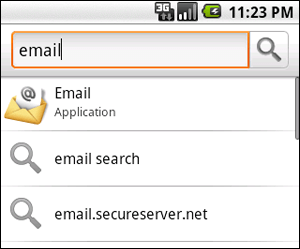
The origins of the idea of the universal search block Quick Search Box are also located in Donut. Previously, by clicking on the "android" search button, the user simply went to the Google page and got the opportunity to enter a search query there. Version 1.6 allowed to search for content not only on the Internet, but also on the device itself. Now you can search by applications, contacts and other elements of the platform.
The Android Market interface has gained white and green tones in the design, which later became the hallmark of the "Google" mobile platform. There are top lists of paid and free applications. As the third-party development of applications for Android began to develop rapidly, these lists began to play the role of a kind of guideline for the user, the beacon in the ocean of software products.
The camera interface has also undergone changes: the integration of the image gallery has been improved and the delay time has been significantly reduced. This problem has finally ceased to lament, and device manufacturers have replaced this interface with a proprietary software product. Up to version 2.3, Google continued to make minor changes to the camera interface.
Only a few years have passed since then, but now some analysts believe that Android has billions of prerequisites to always remain the favorite of the mobile race. However, time passes quickly. In the olden days, a digital watch with a calculator was considered an incredible achievement for the industry.
Read continuation: 2.0 and 2.1: Digital cake
The contents of the cycle "History of Android":
[1] T-Mobile G1 Autumn Debut: 1.0
[2] 1.x: Sweet Names
[3] 2.0 and 2.1: Digital cake
[4] 2.x: Many small things
[5] 3.x: Honeycomb conquers tablets
[6] 4.0: Ice cream is learning the language
[7] 4.1: First in the Jelly Bean family
[8] 4.2: Care for the visually impaired
[9] 4.3: Modular Philosophy
Based on TheVerge.com
The article is based on materials .
Comments
Post a Comment