
Sometimes readers ask: was there even a third version of Android ? Was! But she had nothing to do with smartphones. Honeycomb platform (“honeycomb” in Russian) has become an operating system for tablet computers. Google has again turned to Motorola for support. "Honey" tablet was named Xoom.
I must say that the third version of the “android” platform can hardly be called saturated with innovations. Significant changes came already in Android 4.0. However, for Honeycomb certain distinctive features were characteristic:
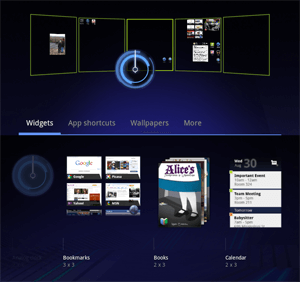
From green to blue. Formerly, green has always been associated with Android. The bright lime logo defined the green tones of the entire platform interface. But with the advent of Honeycomb, the spring-summer color gave way to blue, which was used in battery and signal indicators, the famous clock widget, as well as in other elements of the operating system interface.
Updated desktop design and layout of widgets. Previously, the widget had to choose from the list. But now the user was given the opportunity to first look at the preview of the widget of each type. Of course, from the available in the system. The widget could be placed on each of the five Honeycomb home screen panels. Below the preview of each widget you could see how much space it takes on the screen.

Farewell to the physical buttons. Honeycomb-based tablets no longer needed the physical “Back”, “Home”, “Menu”, and “Search” buttons. The “Back” and “Home” buttons became virtual and located on the new “system panel” at the bottom of the screen. As they became virtual, the operating system gained flexibility: they could be displayed or become hidden, and even be replaced if the need arose. The creators of the tablets got more space for the screen, reducing the "frame" around it.
Improved multitasking. WebOS Designer Martin Duart got a job at Google. And this brought some similarities with webOS on Android. As an example, bring a new virtual button for recently opened applications (Recent Apps). This button was located at the bottom of the screen and allowed to display a list of recently launched applications and a screenshot of each of them. In the version of Gingerbread and its previous firmware, recent applications could be viewed by holding the Home button for a long time. Users rarely accessed this opportunity. In addition, only application icons without screenshots were displayed.

A new paradigm for the location of applications. In Honeycomb debuted the concept of "action bar" (action bar). This panel is located at the top of each application. Developers could use it to provide the user with access to frequently used options, context menus, and other similar controls. It has become a kind of personal status bar for each of the applications. In addition, Honeycomb has added support for displaying the application in several columns. This was an important innovation for a tablet-oriented operating system.
Android 3.1 and 3.2 continued to be named Honeycomb. They brought with them some important features that later appeared in most tablets, originally based on Android 3.0. In version 3.1, it is possible to resize the widget on the home screen. The size was changed with the help of “anchors”, which arose when you click on the application icon and hold your finger on it. Various third-party shells have previously made it possible to change the size of the widgets, but in Android 3.1, support has become native to the operating system.
In the old days, other leaders dominated the market for mobile operating systems, including the BlackBerry platform with a long and glorious history. Then smartphones became massive and it was time for new favorites: the legendary iOS, as well as Android.
Read continued: 4.0: Ice Cream Learns the Language
The contents of the cycle "History of Android":
[1] T-Mobile G1 Autumn Debut: 1.0
[2] 1.x: Sweet Names
[3] 2.0 and 2.1: Digital cake
[4] 2.x: Many small things
[5] 3.x: Honeycomb conquers tablets
[6] 4.0: Ice cream is learning the language
[7] 4.1: First in the Jelly Bean family
[8] 4.2: Care for the visually impaired
[9] 4.3: Modular Philosophy
Based on TheVerge.com
The article is based on materials .
Comments
Post a Comment