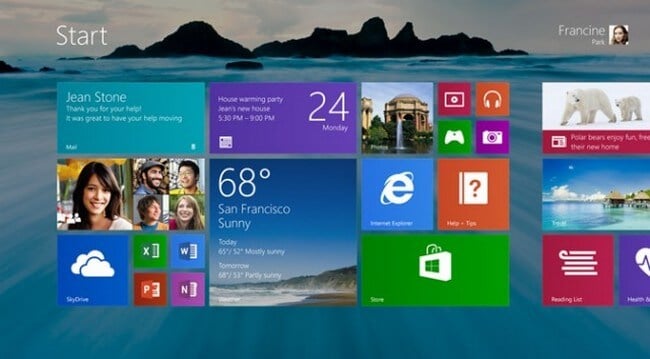
Microsoft decided not to avoid a lot of leaks and published its “first look” on Windows 8.1 (codename Blue). As expected, the Start button will return to the new version of the OS, but with different functionality.
Updated interface and personalization
In a Windows 8.1 update, the software giant threw all efforts to improve the Metro interface. Desktop desktop owners who have adapted to the changes and managed to love the interface of Metro or tablets running Windows 8 will love Windows 8.1. The rest are likely to be disappointed to the depths of the soul.
In the official address of Microsoft, which contains about 2000 words about the main features of Windows 8.1, the new features of the desktop are described literally in two words.
The lock screen in Windows 8.1 has undergone several changes. New functionality and flexible customization of the start screen has become available. On the lock screen, you can now start a slideshow of photos stored on your computer’s hard drive or in SkyDrive cloud storage. Without leaving the lock screen, you can now answer calls on Skype or activate a webcam.
In the new classic Windows 8.1 interface. "Creating a greater sense of unity and familiarity" will be able to set the same desktop wallpaper as in the Metro interface. Also worth mentioning is the flexible configuration of tiles: resizing, moving and creating groups.
View mode All Apps
The All Apps view, which is a complete list of applications installed on your computer, has been completely redesigned in Windows 8.1. The list of installed applications can now be sorted by the following criteria: name, installation date and popularity. Unfortunately, there is no mention of the ability to manually sort the list to your liking.
Unfortunately, when you click Start, instead of moving to the compact list, users will get the next screen. You can set up a new “Start” button as follows: click on the button to switch to the start screen of the new Windows-style interface or move to the All Apps view.
Search

Search in Windows 8.1 has undergone significant changes. It will now become global and, at the request of the user, in order to obtain the desired result, he will go through each application, every file on the computer, in the SkyDrive repository and on the web to get the results. In the image above, it becomes clear what is meant and how it looks. True, this process will become a bit tedious if the user, for example, needs only to start Photoshop.
PC settings
PC settings in Windows 8.1 provide access to all settings on the computer, without the need to go to the control panel on the desktop. Everything is collected in one place. As far as possible in practice, we will be able to see pretty soon.
Lower resolution support and snap view
Perhaps one of the major changes is the adaptation of the Metro interface to low resolution and work with several applications simultaneously. In other words, on one screen, users will be able to run several applications simultaneously, which will be located next to each other.
It is also worth noting the possibility of resizing running applications. Having several monitors connected at the same time, you should not forget that the Metro interface and the start-up screen are no longer tied to just one monitor.
While Windows 8 requires a minimum resolution of 1280 x 800 pixels, the update will bring support for a lower resolution of 1024 x 768 pixels, which will take advantage of the Snap View mode on 7-inch and 8-inch Windows 8.1 tablets.
Internet Explorer 11 and new applications
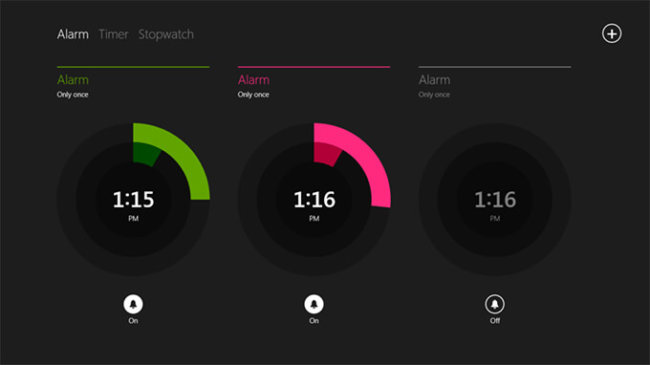
Significant improvements will also receive built-in applications for working with photos and music. We should also mention the new version of Internet Explorer 11, which will provide faster loading of pages and close synchronization with the services of the software giant. Reported and new applications, including a calculator, alarm clock, health and fitness, as well as food and beverages.
findings
In general, all these updates will make Windows 8.1 much better for tablets and ultrabooks with touch screens, but it looks like the owners of desktop computers have been forgotten again. Recall, earlier, Microsoft stated that the Windows 8.1 update will take into account all the wishes of users, but the return of the Start button with other features suggests that the software giant continues to move along the course. Perhaps Microsoft is too proud to simply return the Start button, or it truly believes in the bright future of full-screen applications.
Microsoft will officially introduce Windows 8.1 during the Build 2013 conference, and in the fall it can be downloaded for free from the Windows Store.
The article is based on materials .
Comments
Post a Comment